Althaia Typeface: A Bold Serif Font for Digital Design
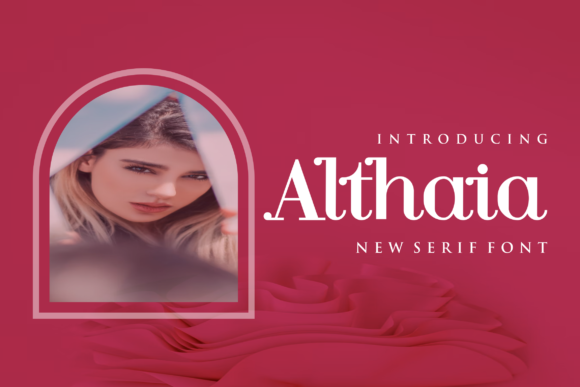
In the world of web design and digital product creation, choosing the right font can make all the difference. Althaia is a bold and stylish serif typeface that stands out in any branding project, from logo design to t-shirt printing and beyond. Its strong visual presence and refined character set it apart as a premium font ideal for designers who want to create professional, engaging, and memorable brand-focused experiences.
Visual Characteristics and Personality
Althaia brings a modern edge to traditional serif typography. It features crisp lines, well-proportioned letterforms, and subtle detailing that adds elegance without sacrificing clarity. The font has a confident and commanding tone, making it perfect for headers and display text where impact matters most. Unlike some serif fonts that lean heavily into vintage aesthetics, Althaia balances classic structure with contemporary flair, fitting seamlessly into both editorial design and digital-first projects.
Its personality is assertive yet sophisticated—ideal for brands that want to communicate authority while maintaining approachability. Whether used in a hero section on a landing page or as the title for a course sales page, Althaia ensures your message is read and remembered.
Using Althaia in Web Design Projects
As a UI designer, I often look for fonts that work across different platforms and screen sizes. Althaia shines in website headers, especially when paired with a clean sans serif for body copy. This contrast helps establish a clear visual hierarchy, guiding users' eyes toward key messages like call-to-action buttons or featured product titles.
- Landing Pages: Althaia works beautifully in hero sections where you need to grab attention quickly. Its bold nature makes it stand out against full-bleed images or video backgrounds.
- Online Store Banners: For banners promoting seasonal collections or flash sales, Althaia’s structured serifs add a touch of professionalism and style.
- Blog Headers and Content Sections: Use it for blog titles or content headings to give your editorial site a more polished, magazine-like feel.
- Portfolio Sites: If you’re designing a creative portfolio, Althaia conveys confidence and artistry, reinforcing a strong personal brand identity.
- Digital Ads and Social Media Graphics: In short-form content such as Instagram posts or Google ads, Althaia ensures legibility while adding a decorative accent that elevates the overall design.
Readability and User Experience
Despite its bold appearance, Althaia is surprisingly readable even at smaller sizes. However, it's best reserved for display use rather than body text. When using it for short phrases or buttons, ensure sufficient line height and spacing to maintain scannability. On mobile screens, avoid pushing the font too small—stick to a minimum of 16px for optimal readability.
When placed on dark backgrounds, Althaia retains its sharpness thanks to its high contrast and open apertures. For light backgrounds, consider using a slightly bolder weight or adjusting the letter spacing to enhance visibility. As a rule of thumb, always test how the font renders on various devices and browsers to guarantee consistent performance.
Brand Tone and Professionalism
Typefaces are not just about aesthetics—they shape the perception of a brand. Althaia exudes professionalism and creativity, which is why it's an excellent choice for SaaS startups, boutique online stores, or coaching websites aiming to build trust with their audience. Its structured form gives a sense of reliability, while the stylistic details hint at innovation and thoughtfulness.
For example, a boutique clothing store might use Althaia in its logo and headline sections to create a distinctive yet elegant brand image. Similarly, a creative agency could leverage it in portfolio headers and service descriptions to reinforce a modern and artistic identity.
Font Pairing Strategies
Pairing Althaia effectively is essential to creating balanced layouts. Since it’s a display serif, it pairs well with minimalist sans serif fonts like Lato, Montserrat, or Inter for body text. This combination maintains readability while allowing the serif to take center stage in headlines and titles.
Consider using Althaia as a primary header font and then switching to a neutral sans serif for subheadings and body copy. This strategy enhances layout rhythm and keeps the user experience smooth and focused. Avoid pairing it with other decorative fonts unless you're going for a very specific, high-contrast theme—Althaia is bold enough on its own.
Practical Applications Across Platforms
Let’s dive into real-world examples of how Althaia can be applied:
- Creative Portfolio Website: Showcase your work with Althaia in section headers and project titles. It adds a layer of sophistication that complements photography or illustration-heavy sites.
- Boutique Online Store: Use Althaia in product category headers and promotional banners to create a cohesive and upscale shopping experience.
- Coaching or Consulting Site: Apply it to hero statements or feature boxes to convey expertise and credibility.
- Product Landing Page: Highlight key selling points and CTA buttons with Althaia to make them visually prominent and trustworthy.
- Course Sales Page: Make your course titles pop with this striking serif, helping potential students focus on what matters most—the value proposition.
- Social Media Graphics: Incorporate it into Instagram carousels or Facebook banners to elevate the visual appeal of your content marketing efforts.
Whether you're working on a single-page app or a multi-section website, Althaia adapts well to various contexts. Just remember to use it sparingly and strategically to maintain visual balance and prevent overwhelming the user interface.
Designing for Consistency and Conversion
A strong brand identity relies on consistent typography. Althaia supports this by offering multiple weights and styles that allow you to maintain tonal consistency across your site. You can use lighter versions for subheadings and heavier ones for CTAs, ensuring a unified yet dynamic typographic system.
In conversion-focused layouts, such as sales funnels or lead capture pages, Althaia can help emphasize critical elements like pricing, testimonials, or subscription prompts. Its bold presence naturally draws attention, making it easier for users to scan and act upon important information.
Technical Considerations for Web Use
Before implementing Althaia in your designs, check if it includes webfont formats (like WOFF or TTF) and multilingual support. These factors are crucial for global audiences and responsive web design. Also, verify whether alternates or ligatures are available—these can add subtle refinement to your branded assets.
For developers, embedding Althaia via CSS should be straightforward. Ensure you include fallback fonts and optimize loading times for faster performance. Using it in SVGs or layered PSDs also allows for greater flexibility in crafting design assets like logos or social media templates.
Commercial Licensing and Legal Clarity
One thing every designer must consider is licensing. Althaia is a commercial font, so it’s essential to confirm the license covers your intended use—whether it’s for a client project, an online store, or digital templates. Many foundries offer flexible licensing options, including desktop, web, and application licenses. Always review the terms before deployment to avoid legal issues down the line.
If you're building a brand kit for a startup or entrepreneur, Althaia can serve as the cornerstone of your typography strategy. Just ensure the font license includes rights for print, web, and social media usage to cover all bases.
Enhancing Brand Identity Through Typography
Typography plays a pivotal role in shaping a brand’s voice and visual language. Althaia is more than a creative font—it’s a tool for storytelling. Its unique blend of boldness and elegance aligns with brands that want to express innovation while maintaining a grounded, professional tone.
Use Althaia to craft a brand identity that feels both modern and timeless. Whether it’s in email templates, packaging design, or app icons, the font helps maintain a consistent look and feel across all touchpoints. And because it works equally well in print and digital, it’s a versatile choice for any designer looking to unify their brand’s presence.
Remember, the goal isn’t just to choose a beautiful font but to select one that aligns with your brand values and resonates with your target audience. Althaia does exactly that—offering a bold, stylish option for those who want their typography to reflect strength and creativity.